Historical source · 2021–2022
Original guide · Navigator Builder
Preserved original documentation, with its original version context.
On this page
Navigator Builder
Sometimes it is necessary to insert a widget above the Navigator, but below MaterialApp/CupertinoApp, e.g. to insert a provider that needs access to the app's context to get the current locale and localization, to build a UI outside of navigation or to completely replace with Navigator with something of your own (which is outside the scope of this document).
For these purposes, you need to use the navigatorBuilder parameter in the GoRouter constructor. This is similar to the builder parameter in the MaterialApp constructor, but gives access to infrastructure provided by MaterialApp.
An example of placing some data provider widget:
final _router = GoRouter(
  routes: ...,

  // add a wrapper around the navigator to put loginInfo into the widget tree
  navigatorBuilder: (context, state, child) =>
    ChangeNotifierProvider<LoginInfo>.value(
      value: loginInfo,
      builder: (context, _) => child,
    ),
);
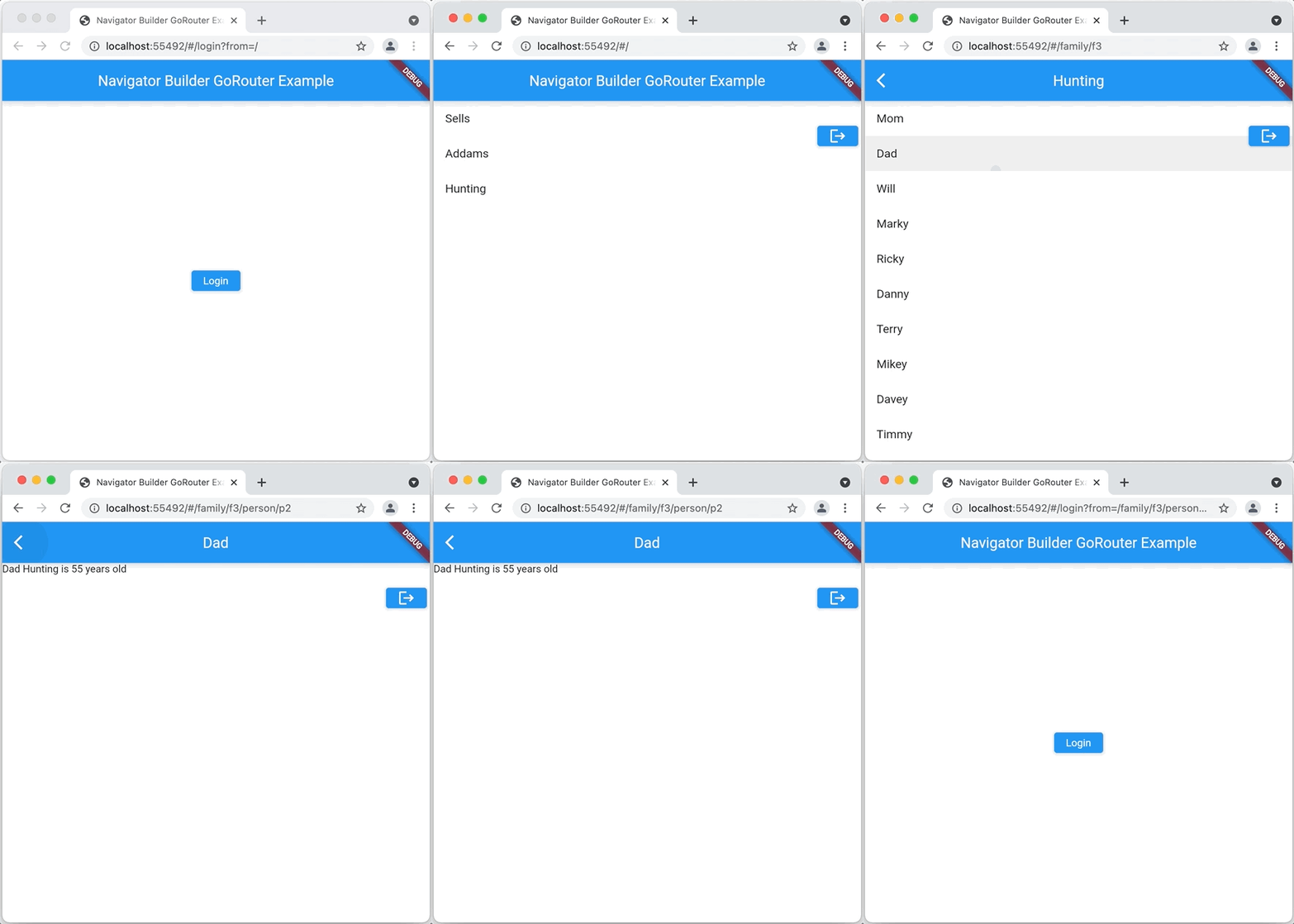
A more interesting example of using navigatorBuilder is the following, which puts a floating button on every page to allow for easy logout:
final _router = GoRouter(
  routes: ...,

  // add a wrapper around the navigator to:
  // - put loginInfo into the widget tree, and to
  // - add an overlay to show a logout option
    navigatorBuilder: (context, state, child) =>
        ChangeNotifierProvider<LoginInfo>.value(
      value: loginInfo,
      builder: (context, _) =>
        loginInfo.loggedIn ? AuthOverlay(child: child) : child;
      },
    ),
);
This example checks the login status in the navigatorBuilder:
- if the user is logged in, an instance of the
AuthOverlaywidget is created, which wraps the theNavigatorpassed tonavigatorBuildervia thechildparameter and provides a logout button on every page - if the user is not logged in, return the
Navigatorvia thechildparameter
The AuthOverlay shows the logout button and the Navigator in a Stack:
class AuthOverlay extends StatelessWidget {
  const AuthOverlay({required this.child, Key? key}) : super(key: key);

  final Widget child;

  @override
  Widget build(BuildContext context) => Stack(
        children: [
          child,
          Positioned(
            top: 90,
            right: 4,
            child: ElevatedButton(
              onPressed: () {
                context.read<LoginInfo>().logout();
                context.goNamed('home'); // clear out the `from` query param
              },
              child: const Icon(Icons.logout),
            ),
          ),
        ],
      );
}
Here's what this look like in action:
Sources & version context
GoRouter.dev documentation edition. The preserved text describes the original package APIs. Follow the current guide before using it in a new project.