Current field guide · 2026
Make a deep link survive reload
Clean paths require both Flutter URL configuration and a host that serves the app entry point for valid application routes.
On this page
Hash and path are hosting decisions too
A hash URL keeps the client-side destination after #. A path URL exposes the destination in the normal path. The cleaner appearance of path URLs comes with a server requirement: requesting a nested location must still return the Flutter application.
Set the Flutter strategy
Use the supported flutter_web_plugins URL strategy helper during app initialization. Check the framework documentation for the SDK you ship, and keep the web base path consistent with where the app is deployed.
Configure a scoped fallback
For a Flutter single-page app, rewrite valid app paths to index.html. Serve actual assets normally and avoid rewriting missing JavaScript or CSS into HTML. If the app shares a host with APIs or a documentation site, scope the fallback to the application mount point.
Verify over HTTP
Paste a nested URL into a fresh browser, refresh, and confirm the returned document and asset content types. This documentation site is statically generated and intentionally returns a real 404 for an unknown documentation page; it does not use an application-wide index fallback.
import 'package:flutter_web_plugins/url_strategy.dart';

void main() {
  usePathUrlStrategy();
  runApp(const App());
}

// Configure your web host for your app's mount point.Sources & version context
GoRouter.dev documentation edition. Examples illustrate the APIs described in the linked primary documentation. Adapt application-owned widgets and services to your project. They are not an executed Flutter session in this browser.
Test a deep-link response before debugging the router
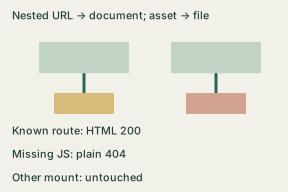
A navigation click can work while a fresh request fails. Flutter’s path strategy requires host configuration; its development server can hide a missing production rewrite. Test the document response and resource responses separately. The existing Dart fragment above is unchanged; this exercise tests an HTTP policy, not a new Flutter build.
- Write the application mount and supported route shape. This fixture reserves
/demo/books/<digits>; it does not capture documentation pages elsewhere. - Keep a real file response ahead of the route fallback. Missing resources under
/demo/assets/remain 404; HTML with status 200 is not a successful JavaScript download. - Request a known nested route directly, then reload it. Compare status, Content-Type and the entry document marker. Repeat with a query string; it must not become part of the path match.
- Test unknown routes, a missing asset and a different mount. Preserve the raw responses. Only after these pass should you investigate the Flutter route match and loaded data.
Completed local HTTP fixture
The downloadable Python 3 standard-library example serves a tiny document marker, one JavaScript resource and this explicit route policy. Run python3 reload_fixture.py in a scratch directory, then open http://127.0.0.1:9435/demo/books/42. It binds only to loopback, installs nothing and does not change your server.
/demo/books/42                 200 text/html
/demo/books/42?from=mail       200 text/html
/demo/assets/app.js           200 application/javascript
/demo/assets/missing.js       404 text/plain
/demo/assets/missing.css      404 text/plain
/demo/not-a-route             404 text/plain
/documentation/missing       404 text/plain
/demo/books/not-an-id         404 text/plain
These are the fixture’s expected outcomes. Its --check mode makes real local HTTP requests and asserts the matrix. The marker is not a compiled Flutter application; a passing matrix cannot prove widget rendering, client-side unknown-route handling or API availability. A production host may use a different routing policy, so adapt and test it independently.
Download the complete local fixture. Record mount ___; route shape ___; entry marker ___; each URL/status/type ___; resource 404 preserved ___; application checks still pending ___.